Claude can now look at your bank and card accounts and tell you where your money went. It can't move a dollar. Here is what that means for parents running a business from home, what to check before you connect anything, and why "look, don't touch" is the right first job for AI near your money.
By Warren Schuitema, AI Systems Consultant, Matchless Marketing / Matchless AI
Published: November 8, 2026 | Last Updated: November 2026

It's Sunday night. The kids are finally down. You open the banking app, then the credit card app, then the other credit card app.
Somewhere in there is the answer to a simple question. Where did the money go this month?
You scroll. You squint. You find a subscription you swore you canceled. Forty minutes later you close the laptop with a rough guess and a knot in your stomach.
This week, Anthropic offered a different way to do that job. Its AI assistant, Claude, can now connect to your bank and card accounts, read your transactions, and answer plain questions about your money.
So, should you let it? For most people, trying it on household accounts is a reasonable step with three guardrails. Start with one bank. Check every important number against your bank's own app. Keep your business accounts out of it for now. It's worth a look for one simple reason. The tool can only read. It can't pay, transfer, or invest anything.
Quick note: I'm not a financial advisor, and this isn't financial advice. This is a practical look at a new tool from someone who builds AI systems for a living and has a family budget of his own.
Key Takeaways
- On November 5, 2026, Anthropic launched Personal Finance in Claude, in beta for Pro, Max, and Ultra plans in the U.S. Anthropic says access "is read-only, and Personal Finance can't move, manage, or invest your money."
- Accounts connect through Plaid, so Claude never sees your bank password. Hub chats "aren't used to train our models," per Anthropic.
- 26% of Americans have already used an AI chatbot for personal finance questions, according to a July 2026 NerdWallet survey by The Harris Poll. Of those who acted on the advice, 29% said it hurt their finances.
- 75% of small business owners used personal credit cards or personal loans for business expenses in the past 12 months, per a May 2026 Bluevine survey. Household money and business money are tangled for a lot of us.
- The safest first job for any AI near your money is reading. Let it look and explain. Keep the spending decisions with you.
Claude Can Now Read Your Bank and Card Accounts, and Nothing More
Here is what Anthropic actually launched, in plain terms.
What it is. Personal Finance is a new area inside Claude. You link your accounts and ask questions like "Where did my money go this month?" Claude answers from your real transactions and can build charts and simple dashboards.
Who gets it. Anthropic says it "starts rolling out in beta this week, on the Pro, Max, and Ultra plans in the US." Its help center adds that it "isn't available on Free, Team, or Enterprise plans." It's rolling out gradually, so you might not see it yet.
How it connects. Plaid, a service many budgeting apps already use, handles the bank connection. You sign in to your bank yourself, pick which accounts to share, and Claude gets read access. Anthropic's help center says Claude "doesn't ask for or see your bank password."
What Claude can see. Anthropic says Claude sees "the bank's name, each account's name, type, and last four digits, balances and credit limits, and up to two years of transactions." You can link up to 16 banks.
What it can't do. This is the part that matters most. Anthropic's own words: "Access is read-only, and Personal Finance can't move, manage, or invest your money." It also says the feature "isn't designed to give investment advice."
What happens to your data. Anthropic says conversations in the Personal Finance hub "aren't used to train our models," and chats that use your accounts are "designed not to save anything from that chat to memory." It also says the feature has "no ads or sponsored recommendations."
Claude isn't first here. MacRumors and The Next Web both report that OpenAI added a similar feature to ChatGPT in May. Two of the biggest AI assistants now want a look at your bank account. Good week to decide your own rules.
Lots of People Already Ask AI About Money, and the Results Are Mixed
Plenty of people already do this, just without guardrails.
One in four Americans has tried it. NerdWallet worked with The Harris Poll on a survey published July 22, 2026. It found 26% of Americans have used an AI chatbot for personal finance questions. About half of those users had asked a money question in the past week.
The outcomes split. Among people who acted on chatbot money advice, 39% said it helped their finances. But 29% said it hurt. That's close to a coin flip with a thumb on it.
People are pasting in things they shouldn't. The same survey found 77% of users had shared some personal information with a chatbot. 10% had shared account numbers. 9% had shared a Social Security number.
Read that last line twice. Nearly one in ten people asking AI about money had typed their Social Security number into a chat box.
It's global, too. EY's second Global AI Sentiment Survey, published in April 2026, covered 18,152 people in 23 countries. 49% had used AI to support savings and investment decisions in the past six months.
People already let AI near their money. What matters now is using a tool that can't hurt you, with habits that keep you in charge.
A read-only bank link beats pasting statements and account numbers into a chat. You see what you're sharing. You can unlink it. And the AI can't act on a bad idea, even if it has one.
For Parents Running a Business From Home, the Money Is Tangled
If you run a business from your kitchen table, your money probably doesn't live in neat boxes.
The personal card picks up the software bill when the business account runs low. You mean to sort it out at tax time.
You're far from alone. A May 2026 survey of 864 small business owners, run by Centiment for Bluevine, found 75% had used personal credit cards or personal loans for business expenses in the last 12 months. 42% said doing so affected their own personal finances.
That's why this launch is both useful and tricky for our crowd.
Useful, because a tool that reads two years of household transactions will surface the business costs hiding in your personal accounts. The software trial that became a monthly charge. The subscription you pay for twice.
Tricky, because Anthropic built this for personal money. It's limited to individual paid plans and left off Team and Enterprise. The help center does say you can link "a second login at the same bank, such as a joint or business account." But nothing I found in Anthropic's materials says it was designed for running a business.
One more limit: the help center says Claude "can't use your linked accounts in scheduled tasks, Cowork tasks, or Claude Code." So you can't hand this to an automated assistant to run your books every Friday. You sit down and talk to it.
Read-Only Is the Right First Job for Any AI Near Your Money
Here's my take. The most important word in Anthropic's announcement is "read-only." Every company that wants AI near your money should start there.
Supply chain and accounting teams have a name for an old idea: separation of duties. The person who counts the inventory shouldn't be the same person who can approve a big purchase. The person who reconciles the bank account shouldn't be the one who signs the checks. The goal is a system where one mistake can't quietly become an expensive one.
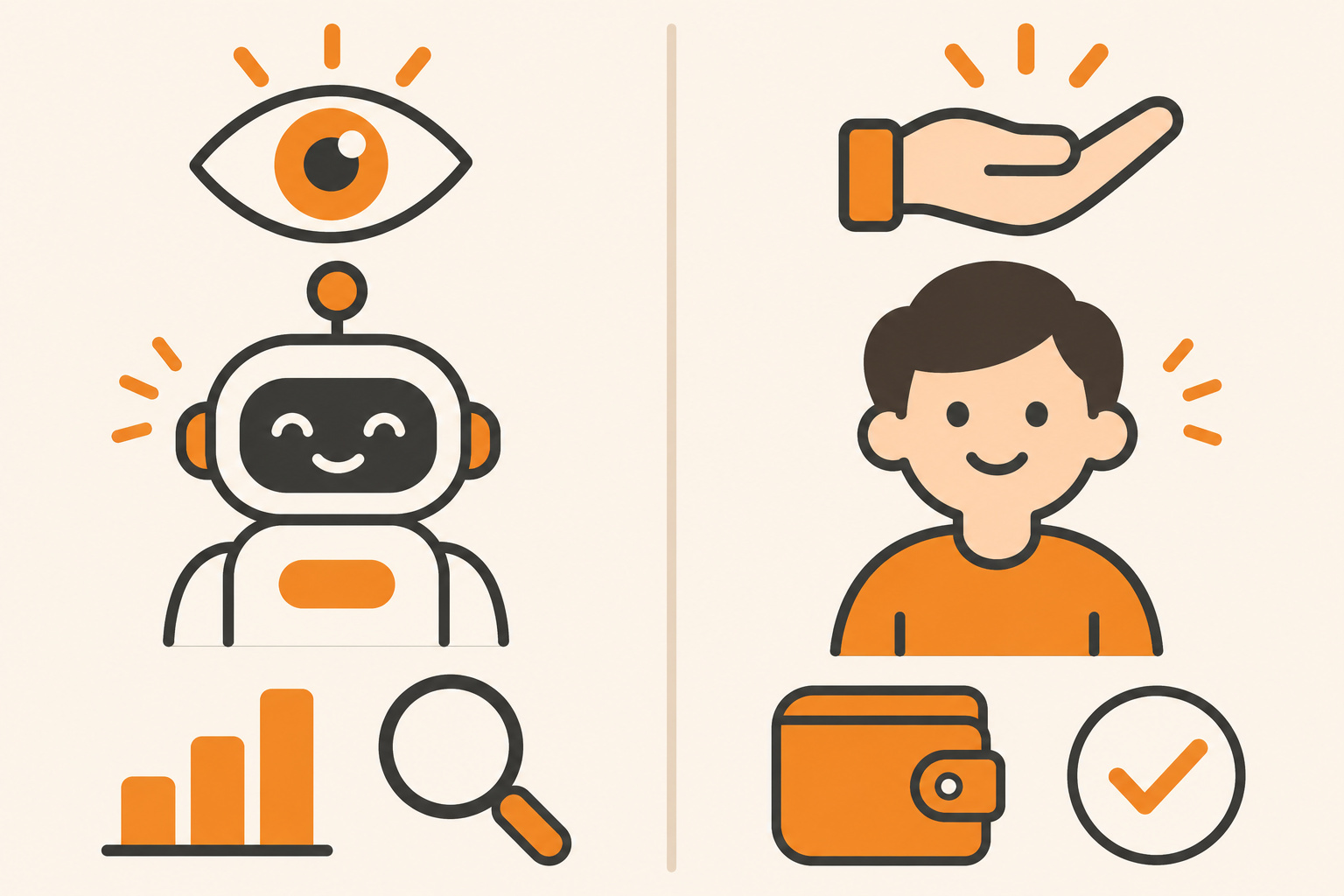
AI deserves the same setup. I think of it in two jobs.
Job one is eyes. Reading. Sorting. Spotting the duplicate charge. Turning 24 months of transactions into a chart you can understand. AI is fast at this, and a mistake here costs you a few minutes of double-checking.
Job two is hands. Moving money. Paying bills. Canceling accounts. Choosing where to invest. A mistake here can cost real money, and some of those mistakes can't be undone.
I call this Eyes Before Hands. Give AI the eyes first. Keep the hands for yourself, at least until the tool has earned your trust over months, not days.
Claude Personal Finance, as launched, is all eyes. That's a feature. It means the worst-case outcome is a wrong answer you catch, instead of a wrong transfer you can't reverse.
My AI Agents Draft and Flag. Only I Can Spend.
I run my own business this way.
Matchless Marketing runs day to day on a workforce of AI agents. Each one has a name, a written job description, and one lane. One drafts content. One keeps the numbers. This article started in that system, and I get the final word before anything goes out.
The most important rule in that whole system is written into every agent's instructions. Nothing sends, posts, invoices, books, buys, signs, or spends on my behalf without my word. The agents draft. They flag. They explain. They hold everything for me.
That rule speeds the business up. Because nothing can go out the door without me, I can let the agents read widely and work fast. The guardrail is what makes the speed safe.
The same thinking shows up at home.
When I built our Digital Wall Calendar, it replaced a family calendar subscription that cost us $50 a month. That was the money win. The bigger win was what it ended: the nightly "what does tomorrow look like" conversation. Everyone in the house looks at one place now. My Weekly Meal Planner did something similar. It replaced HelloFresh and ended our Sunday planning spiral.
Neither system needed permission to spend a dime to save us money. They just made things visible. Once you can see where the money and time go, the decisions get easy.
That's what a read-only money tool should do for you. Show you the $50 a month you forgot about. Then step back and let you decide.
What Claude Personal Finance Is Good For, and Where It Stops
If you try it, here's where I'd point it first, and what to watch.
Good first questions:
- "Where did my money go last month?" Then: "Is that more than usual?"
- "Which subscriptions am I paying for?"
- "Any charges that look like duplicates or unexpected fees?"
- "Which of these charges look like business expenses?" (Still check each one yourself.)
Where it stops:
- Balances can be a little old. The help center says "balances can be a day or two old." Don't use it to decide whether a payment clears today.
- It sees only what you link. If one bank isn't connected, the help center warns, "a budget can show more money left than you have."
- Investment and loan accounts are thin. Claude reads balances and credit limits there, "not holdings, trades, rates, or terms."
- Unlinking works per bank login. You can't unlink just one account at a bank.
- Answers you already got stick around. Anthropic says what Claude already said "stays in your chats, and in any artifacts or shared links until you remove them," even after you unlink a bank.
- It can be wrong. Anthropic says so plainly: "Claude is AI and can make mistakes. Check important figures against your bank's own app or statements."
Here's a quick example to make it concrete. This is a made-up family, not a client story.
Picture a dad who runs a pressure-washing business on weekends. He links the family checking account and one card, then asks which subscriptions he's paying for. The list shows two cloud storage plans, one for the business and one from years ago for family photos, plus a design app trial that turned into a monthly charge. He cancels the extras himself, moves the business charge to the business card, and spends Sunday night watching a movie.
The AI did the looking. He did the deciding.
Should You Connect Your Business Accounts?
For now, I'd hold off. Anthropic built this for personal use and left Team and Enterprise plans out. Your business accounts also carry more weight: client money, tax money you've set aside, and maybe a bookkeeper or partner who expects a clean record of who sees what.
Here's how I'd split it:
- Household accounts: Reasonable to try, with the guardrails in this article.
- Business accounts: Keep using the tools built for them, like your accounting software and your bank's own reporting. Talk to your bookkeeper or tax professional before you connect business accounts to any general AI assistant.
- The tangled middle: Use the read-only tool on your personal accounts to find business charges hiding there. Then move them into your business system yourself.
That last move is the real win for parent entrepreneurs.
7 Steps to Try AI on Your Money Without Losing Sleep
- Decide your rule before you connect anything. Write one sentence on a sticky note: "AI can read and explain. I decide and spend."
- Start with one bank and one card. Link your main household checking account and the card you use most. Leave everything else off for two weeks.
- Ask the three easy questions first. Where did my money go last month? Which subscriptions am I paying for? Any duplicate charges or unexpected fees? Write down what it finds.
- Check every number that matters. Anthropic itself tells you to "ask which transactions are behind a number." Do that, then confirm in your bank's own app. If the AI can't show its work, don't act on it.
- Make the decisions yourself, by hand. Cancel the subscription in the app that charges you. Move the business expense yourself. The AI points. You click.
- Never paste what the link doesn't need. The whole point of a read-only bank connection is that you never type account numbers, passwords, or your Social Security number into a chat. Keep it that way in every AI tool you use.
- Set a 15-minute monthly money check-in. Same day each month. Ask the same three questions, compare to last month, and unlink anything you no longer want connected. You can also disconnect at my.plaid.com, according to Anthropic's help center.
Frequently Asked Questions
Is it safe to let Claude read my bank account?
Anthropic designed it with real limits. Access is read-only, so Claude can't move, manage, or invest money. Accounts connect through Plaid, so Claude never sees your bank password. Hub chats aren't used for training. It can still make mistakes, so check important figures against your bank's own app before acting on them.
Can Claude move money or pay my bills?
No. Anthropic says Personal Finance "can't move, manage, or invest your money." It reads balances and transactions so it can answer questions, spot fees, and build charts. Any payment, transfer, or cancellation stays with you, done in your bank's app or with the company that charges you. That limit is the main reason it's worth trying.
Who can use Claude Personal Finance right now?
It's in beta for Claude Pro, Max, and Ultra subscribers in the United States, and it's rolling out gradually. Anthropic's help center says it isn't available on Free, Team, or Enterprise plans, and you can link U.S. banks only, up to 16 of them. It works on the web, the desktop app, and the iOS and Android apps.
Should I connect my business bank account to an AI assistant?
I'd wait. Claude Personal Finance was built for personal money and leaves out Team and Enterprise plans. Business accounts hold client and tax money and often need a clear record of access. Use it on household accounts to find business charges hiding there, then talk to your bookkeeper before connecting business accounts to any general AI tool.
Does ChatGPT have a similar feature?
Yes. MacRumors and The Next Web report that OpenAI added a similar finance feature to ChatGPT in May 2026, also using Plaid to connect bank accounts. Whichever assistant you use, ask the same questions before you connect. Can it only read? Where does your data go? How do you unlink? Who can see the answers later?
Let It Look. You Decide.
Remember that Sunday night, three apps open, forty minutes of squinting?
A read-only AI tool can turn that into a five-minute conversation. Where did the money go? What did I forget I'm paying for? What looks off?
The part I care about most is what it can't do. It can't spend. It can't transfer. It hands you the picture and steps back.
That's the same deal I give every AI agent in my business. Read widely. Explain clearly. Hold the money decisions for me.
So run the test I run on every system in my business and my home. Does it give me back Time, Money, or Energy?
Time, because the monthly money check goes from an hour to fifteen minutes. Money, because the forgotten subscriptions and surprise fees finally show up. Energy, because you stop carrying that Sunday night knot around all week.
Eyes for the AI. Hands for you. That's A Better Way.
Keep Learning
- Should Your Small Business Use the Free AI Tools Your Bank Is Offering? The questions to ask any bank or AI supplier before you hand over your data.
- How Do You Get ChatGPT and Claude to Remember the Same Things About Your Business? Why your business memory belongs in a file you own.
- How Do You Keep AI Usage Charges From Surprising Your Small Business? Simple limits so AI tools don't turn into a surprise bill.
- Should You Let AI Chase Your Unpaid Invoices and Close Your Books? The guardrails that make it safe to hand real money work to AI.
- Is Your AI Assistant Quietly Making Your Business Decisions for You? Where to draw the line on what AI decides.
About the Author
Warren Schuitema is an AI Systems Consultant with Matchless Marketing and Matchless AI. He spent 16 years in manufacturing and supply chain before building AI systems for small businesses and families. His business runs day to day on a workforce of AI agents with one firm rule: nothing sends, buys, or spends without his yes. At home, his Digital Wall Calendar replaced a $50 a month subscription and his Weekly Meal Planner replaced HelloFresh. He helps small business owners and parent entrepreneurs build practical AI systems that give back Time, Money, or Energy, and he is a partner in the Goal Achievers Summit. He is not a financial advisor, and nothing in this article is financial advice.